
1. Introduction to ASP.NET
ASP.NET is a powerful framework used for building fast web applications. Consequently, it provides robust tools that help you develop modern websites efficiently. Moreover, these features make the development process much smoother.
Key Features to Start With ASP.NET
- Rapid Development: It enables the quick creation of apps using ready-made libraries.
- Enhanced Security: Additionally, it offers advanced protection against common web attacks.
- High Flexibility: It supports both web and desktop applications effectively.
2. Integrated Development Environment (IDE)
The IDE provides essential tools that simplify coding. Furthermore, it helps in testing applications efficiently. As a result, developers can produce high-quality code in less time.
Essential Tools for Developers
- Built-in Debugger: This tool quickly identifies and fixes code issues.
- Code Auto-Completion: Additionally, it reduces errors and speeds up your coding work.

3. C# and Its Role in ASP.NET
C# is the main language for ASP.NET development. Therefore, it helps creators build organized and powerful applications. In addition, it integrates perfectly with the entire .NET ecosystem.
Reasons to Choose C#
- Clear Structure: It makes your code easy to read and maintain over time.
- Wide Support: Moreover, it is compatible with modern libraries and tools.
- High Performance: It provides fast and efficient execution for your projects.
4. Building Dynamic Pages
Dynamic pages allow users to interact with your site in a flexible way. For instance, according to Stack Overflow, 34% of developers use ASP.NET for this purpose. Consequently, these elements improve the overall user experience.
Dynamic Page Elements
- Forms: Use these to collect user data easily and effectively.
- AJAX: Furthermore, it updates parts of the page without a full reload.

5. Database Management
This feature connects your apps to various data sources. Because of this, you can manage information efficiently. Additionally, it ensures that your data remains organized and accessible.
Core Database Operations
- Insert and Retrieve: Store and fetch information with total ease.
- Update and Delete: Keep your records updated continuously.
- Dynamic Reports: Moreover, you can generate accurate reports instantly.
6. Error Handling
Quick error handling reduces runtime issues significantly. Therefore, it improves the final user experience. In addition, fixing bugs early prevents larger problems in the future.
Effective Error Handling Methods
- Try-Catch: Use this method to control program exceptions easily.
- Log Files: Furthermore, record and analyze errors for later review.
7. Performance Optimization
Optimizing performance increases page speed and satisfaction. Consequently, users will enjoy a smoother interface. Moreover, adopting these strategies helps your app handle more traffic.
Strategies to Speed Up Applications
- Caching: Store data temporarily to reduce database queries.
- Minification: Additionally, reduce file sizes for faster loading.
- Asynchronous Calls: Improve data fetching efficiency through async methods.

8. Security Measures
Security is essential for any successful web application. For instance, W3Techs reports that 20% of global websites use ASP.NET due to its safety. Therefore, focusing on vulnerabilities is a top priority.
Important Security Practices
- Data Encryption: Protect sensitive user information with strong encryption.
- Session Protection: Moreover, ensure accounts are safe from unauthorized breaches.
9. Integration with External Services
Integration with APIs expands your application capabilities. Furthermore, it allows you to connect with other platforms easily. As a result, your app becomes more versatile and useful.
Integration Methods
- REST APIs: Exchange data smoothly between different applications.
- Web Services: Additionally, connect your app with external systems easily.
- OAuth Integration: Secure your logins through reliable third-party services.

10. Testing Tools
Testing ensures that your applications work without errors. For example, GitHub reports that 40% of ASP.NET projects use advanced testing tools. Consequently, this step guarantees high quality before launch.
Key Testing Tools
- Unit Testing: Verify the functionality of each individual code component.
- Load Testing: Moreover, assess how the app performs under heavy stress.
11. Future Development
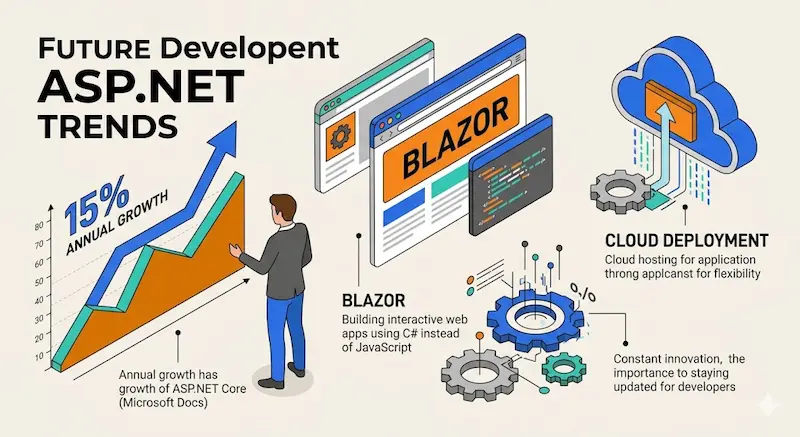
ASP.NET allows for constant innovation through modern updates. Furthermore, Microsoft Docs states that ASP.NET Core grows by 15% annually. Therefore, staying updated is crucial for developers.
Development Trends
- Blazor: Build interactive web apps using C# instead of JavaScript.
- Cloud Deployment: Additionally, host applications on the cloud for more flexibility.