

Understanding the App Idea and User Needs
First, a successful app starts when you understand the core problem. Therefore, clear research helps you define priorities and reduces extra changes later. Here are the key steps:
- Define the Main Goal: Identify the core problem and the exact result users should achieve.
- Understand User Behavior: Study user needs, expectations, and possible obstacles during key tasks.
- Set Clear Priorities: Rank features by importance to keep your initial version focused and practical.
Designing User Experience Before Coding
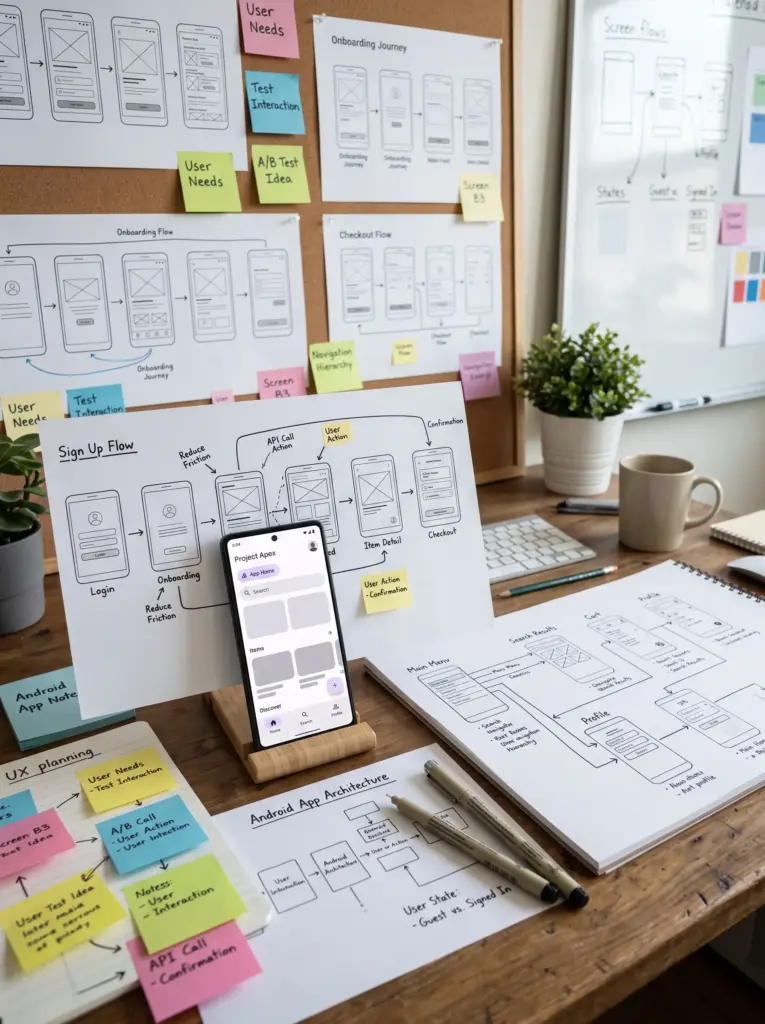
Generally, UX design helps spot navigation problems early. Thus, you can avoid costly code changes. Moreover, early planning builds a strong link between user needs and interface choices. Here are the essentials:
- Map User Journeys: Define every step users take from opening the app to finishing tasks.
- Simplify Navigation: Organize screens so users reach important info quickly and naturally.
- Test Early Concepts: Review prototypes to fix confusing interactions before full development.
Choosing the Right Android Technology
Technology choices directly affect performance, scalability, and maintenance. Therefore, your approach must match project requirements instead of using one stack for all apps. Consider these factors:
- Application Requirements: Determine if your project needs native capabilities or advanced tools.
- Future Scalability: Choose an architecture that supports new features without heavy structural changes.
- Maintenance Needs: Pick clean structures that make code easy to test, update, and maintain.
Improving Application Performance
Poor performance harms usability when screens respond slowly or consume too many resources. Consequently, Android advises monitoring core metrics to avoid crashes and lags. Try these practical solutions:
- Reduce Heavy Operations: Move heavy tasks away from the main interaction flow to boost speed.
- Manage Memory Efficiently: Monitor memory, images, and data usage to stop unexpected app failures.
- Optimize Content Loading: Use caching and progressive loading when handling large data sets.

Creating Responsive Android Interfaces
Android apps run across many screen sizes and device formats. Therefore, flexible interfaces must protect usability and visual clarity instead of using fixed dimensions. Follow these design principles:
- Flexible Layouts: Use adaptable layouts that respond naturally to different dimensions.
- Clear Interface Elements: Maintain readable text, good button sizes, and balanced spacing.
- Support Screen Orientation: Test portrait and landscape views while saving user progress.
Simplifying Navigation and User Flows
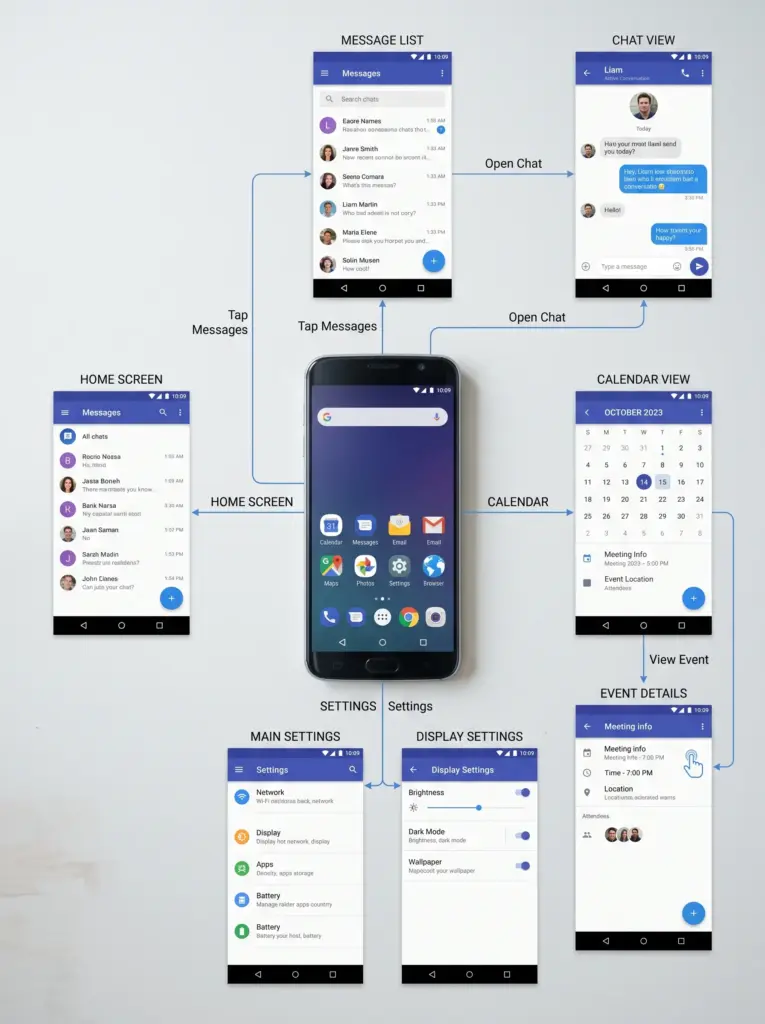
Apps often contain many screens and features. However, adding more options does not create a better experience. Thus, your goal is to organize features so users complete tasks easily. Try these ways to improve:
- Create a Clear Structure: Group related features into clear sections so users find them fast.
- Keep Navigation Predictable: Use consistent patterns so users move between screens smoothly.
- Reduce Unnecessary Steps: Remove extra screens that slow down important tasks.
Designing Better Notifications and Interactions
Notifications bring users back to an app. On the other hand, irrelevant alerts cause user frustration. Therefore, timing, relevance, and user control are key factors for success. Consider these practices:
- Choose Relevant Timing: Send alerts only when they provide useful info or support actions.
- Offer User Control: Let users choose the types of notifications they wish to receive.
- Use Clear Actions: Explain why alerts appear and what happens when users click them.
Protecting Data and Privacy by Design
Privacy must be a priority during the design phase instead of an afterthought. Furthermore, limiting data collection and managing permissions carefully improves both security and trust. Follow these essential rules:
- Minimize Data Collection: Request only the data needed for the app to function properly.
- Manage Permissions Carefully: Ask for device permissions only when genuinely needed and explain why.
- Protect Sensitive Information: Apply strong safeguards when storing and processing user data.

Testing User Experience Before Launch
Designs that look simple in development can reveal flaws during real testing. Therefore, early testing helps catch usability issues and bugs before public release. Focus on these stages:
- Task-Based Testing: Give users specific tasks to see if they can finish them without guidance.
- Device Testing: Test various screen sizes and performance conditions to fix compatibility bugs.
- Error Analysis: Record crashes and sort issues by their impact on users.
Measuring Performance After Launch
App improvement continues after release because real user behavior reveals hidden issues. Furthermore, continuous tracking helps spot weak points and plan future updates. Track these key metrics:
- Retention Rate: Measure how many users return to the app over different periods.
- Crash Rate: Monitor app failures and identify affected devices and versions.
- Task Completion: Track whether users successfully finish actions or drop off.